
Table of Contents
Overview
During a course at OS3 focused on various vulnerabilities, me and a few students thought – “Why not try discovering a new vulnerability?” Thus, this lead us down a rabbit hole of research, and ultimately we discoved CVE-2026-30451. This post details our steps and methods used.
Note: This is more a crude technical write-up, a great introduction to this vulnerability can be found here.
Disclaimer
This vulnerability research is strictly aimed at research purposes. Vulnerability research allows researchers to discover new vulnerabilities, however, this also means that researchers should adhere to ethical considerations. As the discovered vulnerabilities could have real world security implications, its important they follow a responsible disclosure process, for them to not be misused. Refer to Coordinated vulnerability disclosure for more details.
Project Selection
Before we even started, we did some initial research. Finding vulnerabilities could either be done by looking at source code, or by fuzzing. Since our research was strict on time, we choose to use fuzzing as a means to find vulnerabilities in certain programs. We theorized, good targets would be projects implementing parsing, and written in languages that are not memory-safe.
Thus we looked for project that had the following criteria:
- Written in C / C++
- Parser implementations
- Open-source
Using this criteria on GitHub, we found these projects:
- Math Parser (https://github.com/mariuszgromada/MathParser.org-mXparser)
- SQL Parser (https://github.com/hyrise/sql-parser)
- C99 Json Parser (https://github.com/Barenboim/json-parser)
This post will focus on mXparser, since we had the most promising results with this project.
Stage 1: Fuzzing Workspace
The next step was setting up a fuzzing environment. For the actual fuzzer, we decided to use AFL++. We drew inspiration from ASU, where they did similar vulnerability research as this fuzzer supported both ASAN (Address Sanitization) aswell as UBSAN (Undefined Beheviour Sanitization), which would be important.
AddressSanitizer (ASAN) and UndefinedBehaviorSanitizer (UBSAN) make fuzzing far more effective by turning silent memory corruption and undefined behavior into detectable crashes. ASAN catches issues like heap overflows, use-after-free bugs, and stack corruption, while UBSAN detects dangerous undefined behavior such as integer overflows, invalid shifts, and type confusion. Together, they increase bug visibility and improve crash reproducibility, allowing fuzzers to uncover vulnerabilities that would otherwise go unnoticed.
These next subchapters list the steps taken on a fresh VM, in order to prepare it for fuzzing.
1.1 System Preparation
Update and upgrade the system:
sudo apt update && sudo apt upgrade -y
Install required dependencies:
sudo apt install -y \
build-essential \
clang llvm lld llvm \
gcc g++ \
make cmake ninja-build git \
python3 python3-pip \
gdb lldb \
libtool automake \
pkg-config \
qemu-system-x86 \
curl wget \
libstdc++-12-dev
Installs all tools required for building and fuzzing:
- git – clone source repositories
- build-essential – GCC, make, and standard build tools
- clang / llvm – required for AFL++ instrumentation
- cmake / ninja-build – build system generators
- python3 / pip – AFL++ utilities and scripts
- wget / curl – download files if needed
- libstdc++-12-dev – modern C++ standard library headers
1.2 Fuzzing Workspace Setup
Create direcory:
sudo mkdir /srv/Fuzzing
At this point, additional users / fuzzer groups can be added, and permissions set to this directory.
1.3 Core Dump Configuration
Configure the kernel to write core dumps as core files in the current directory:
echo core | sudo tee /proc/sys/kernel/core_pattern
This is essential for debugging crashes found by AFL++.
1.4 AFL++ Installation
Clone the AFL++ repository:
cd ~
git clone https://github.com/AFLplusplus/AFLplusplus.git
cd AFLplusplus
Build AFL++:
make -j$(nproc)
sudo make install
Verify installation:
afl-fuzz -h | head
Confirms AFL++ is installed and runnable.
1.5 Target Setup: mXparser
Create target directory:
mkdir /srv/Fuzzing/targets
cd /srv/Fuzzing/targets
Clone mXparser:
git clone https://github.com/mariuszgromada/MathParser.org-mXparser.git
cd MathParser.org-mXparser
1.6 AFL++ Instrumentation Environment
Set instrumentation environment variables:
export CC=afl-clang-fast
export CXX=afl-clang-fast++
export AFL_USE_ASAN=1
export AFL_USE_UBSAN=1
export AFL_LLVM_ALLOWLIST=$PWD/allowlist.txt
- afl-clang-fast / afl-clang-fast++ – LLVM-based AFL instrumentation
- ASAN – detects memory corruption
- UBSAN – detects undefined behavior
- ALLOWLIST – limits instrumentation to selected code paths
Verify environment:
printenv
Displays all environment variables to confirm configuration.
1.7 Instrumentation Allowlist
Add restrictions to allowlist.txt:
cat > allowlist.txt <<EOF
org/mariuszgromada/math/*
fuzz/*
EOF
Restricts AFL instrumentation to:
- mXparser math logic
- Custom fuzzing code
This improves performance and signal quality.
1.8 AFL++ Fuzzing Harness
Create harness directory:
mkdir -p fuzz
Create fuzzing harness from source:
nano fuzz/fuzz_expr.cpp
#include <iostream>
#include <string>
#include "org/mariuszgromada/math/mxparser/Expression.hpp"

int main() {

	// Confirm non-commercial use
	org::mariuszgromada::math::mxparser::License::iConfirmNonCommercialUse("John Doe");

	std::string input;
	std::getline(std::cin, input);

	org::mariuszgromada::math::mxparser::Expression e(input);
	e.calculate();

	return 0;
}
The purpose of this program:
- Reads one line from stdin
- Passes it to
Expression - Triggers parsing and evaluation
This is the fuzzing entry point.
1.9 Build mXparser (Static Library)
Create build directory:
cd CURRENT/cpp
mkdir build
cd build
Configure with CMake:
cmake .. \
-DCMAKE_C_COMPILER=$CC \
-DCMAKE_CXX_COMPILER=$CXX \
-DCMAKE_BUILD_TYPE=RelWithDebInfo \
-DBUILD_SHARED_LIBS=OFF
- Uses AFL-instrumented compilers
- Includes debug symbols
- Builds a static library (
.a)
Compile:
make -j$(nproc)
This produces lib/libMathParser.org-mXparser.so
1.10 Building Fuzzing Binary
Change directory:
cd /srv/Fuzzing/targets/MathParser.org-mXparser
Build fuzzing binary:
afl-clang-fast++ \
-O1 \
-g \
-fsanitize=address,undefined \
-fno-omit-frame-pointer \
-I CURRENT/cpp/lib \
-DMXPARSER_BUILD_PROJECT_VERSION_MAJOR=5 \
-DMXPARSER_BUILD_PROJECT_VERSION_MINOR=0 \
-DMXPARSER_BUILD_PROJECT_VERSION_PATCH=0 \
fuzz/fuzz_expr.cpp \
-L CURRENT/cpp/build/lib \
-lMathParser.org-mXparser \
-Wl,-rpath,'$ORIGIN' \
-o fuzz_expr
Verify binary is working:
./fuzz_expr <<< "1+2*3"
Confirms correct parsing and execution.
1.11 Seed Corpus
Create input directory:
mkdir -p inputs
Create some initial expressions:
echo "1+1" > inputs/simple.txt
echo "sin(1)" > inputs/sin.txt
echo "2^8+sqrt(9)" > inputs/mixed.txt
Provides initial valid expressions for AFL++ mutation.
1.12 Running Fuzzer
Run fuzzer:
afl-fuzz \
-i inputs \
-o findings \
-- ./fuzz_expr
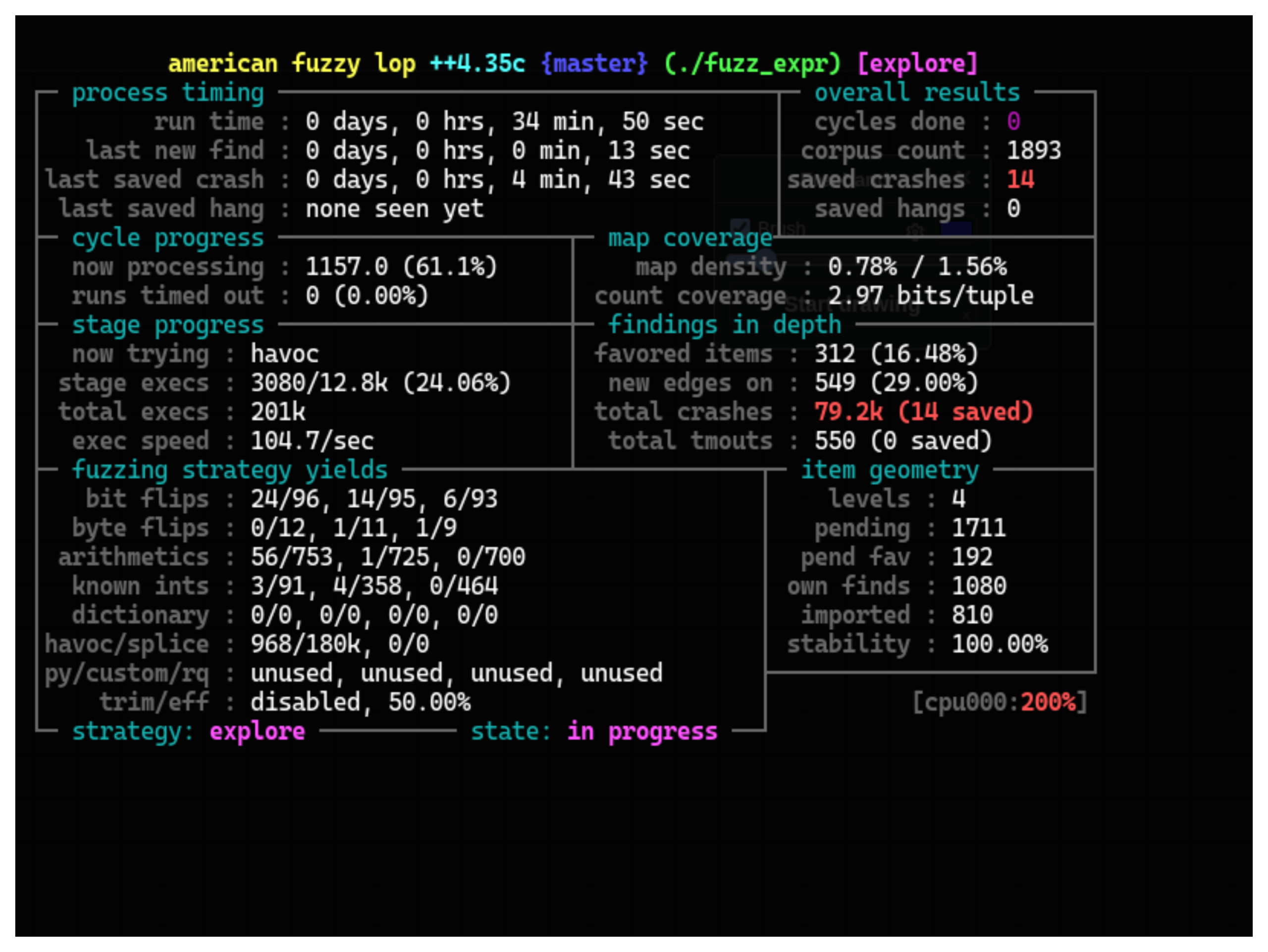
At this stage of our research, we had successfully set up a running fuzzer. However, we noticed that this fuzzer was only utilizing 25% of our CPU. We did some digging. Turns out, by default, a single instance of a AFL++ fuzzer is tied to 1 CPU core. Since our CPU had 4 cores, this meant that we were significantly underutilizing our CPU ponential.
1.13 Running AFL++ Parrallel Fuzzing
Hence, we decided to start scaling up. The idea was simple, we would set up multiple instances of the same fuzzer, where one was a “master” instance, that would control the other ones. Thus we stopped the current fuzzer with CTRL+C, and started implementing the changes.
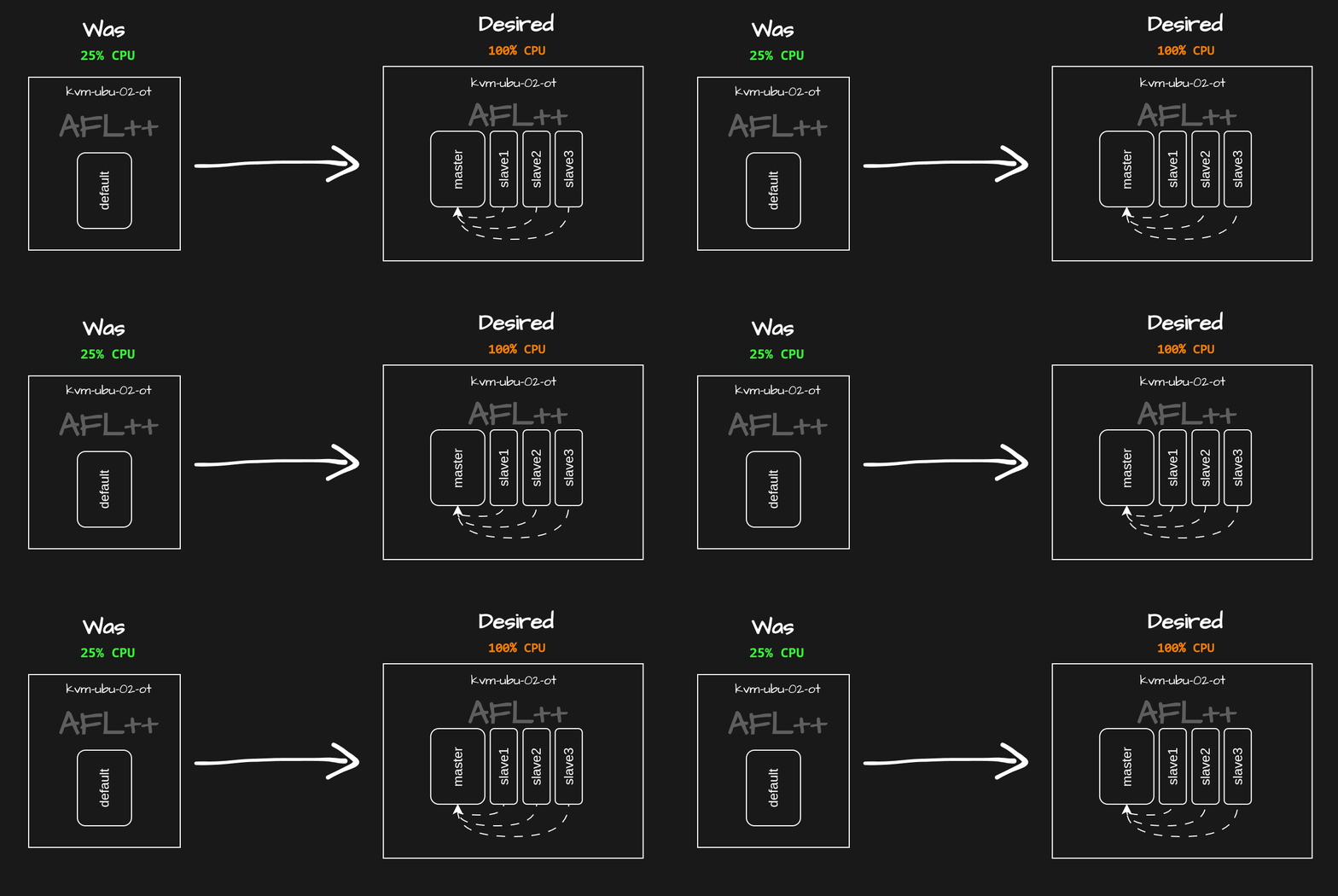
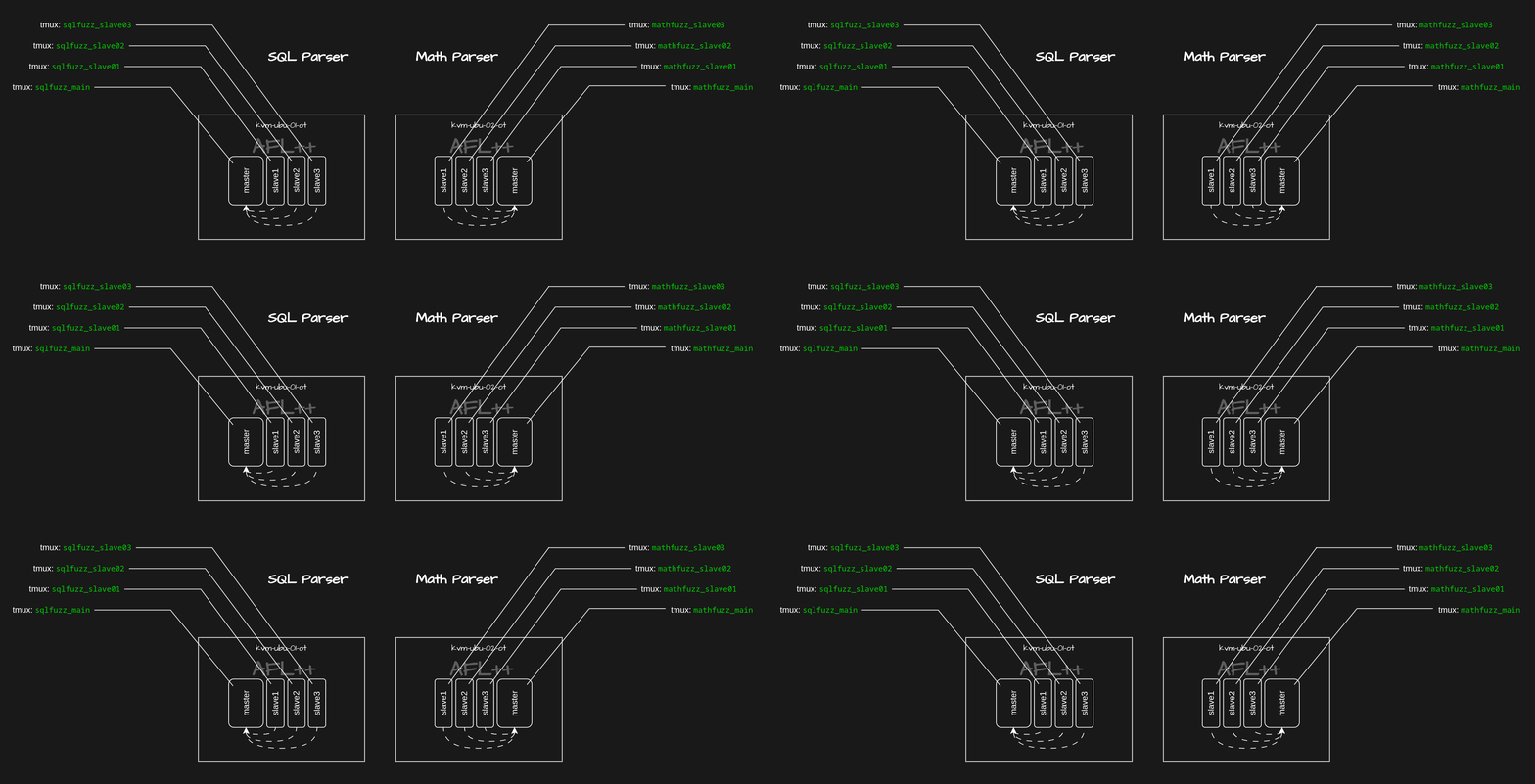
Each fuzzer instance could be accessed via tmux sessions:
tmux new -s mathfuzz_main
tmux new -s mathfuzz_slave01
tmux new -s mathfuzz_slave02
tmux new -s mathfuzz_slave03
Create master instance (This instance will coordinate the fuzzing campaign.):
afl-fuzz \
-i inputs \
-o findings \
-M master \
-- ./fuzz_expr
Within mathfuzz_slave01:
afl-fuzz \
-i inputs \
-o findings \
-S slave01 \
-- ./fuzz_expr
Within mathfuzz_slave02:
afl-fuzz \
-i inputs \
-o findings \
-S slave02 \
-- ./fuzz_expr
Within mathfuzz_slave03:
afl-fuzz \
-i inputs \
-o findings \
-S slave03 \
-- ./fuzz_expr
Each slave instance:
- Shares coverage data
- Explores different mutation strategies
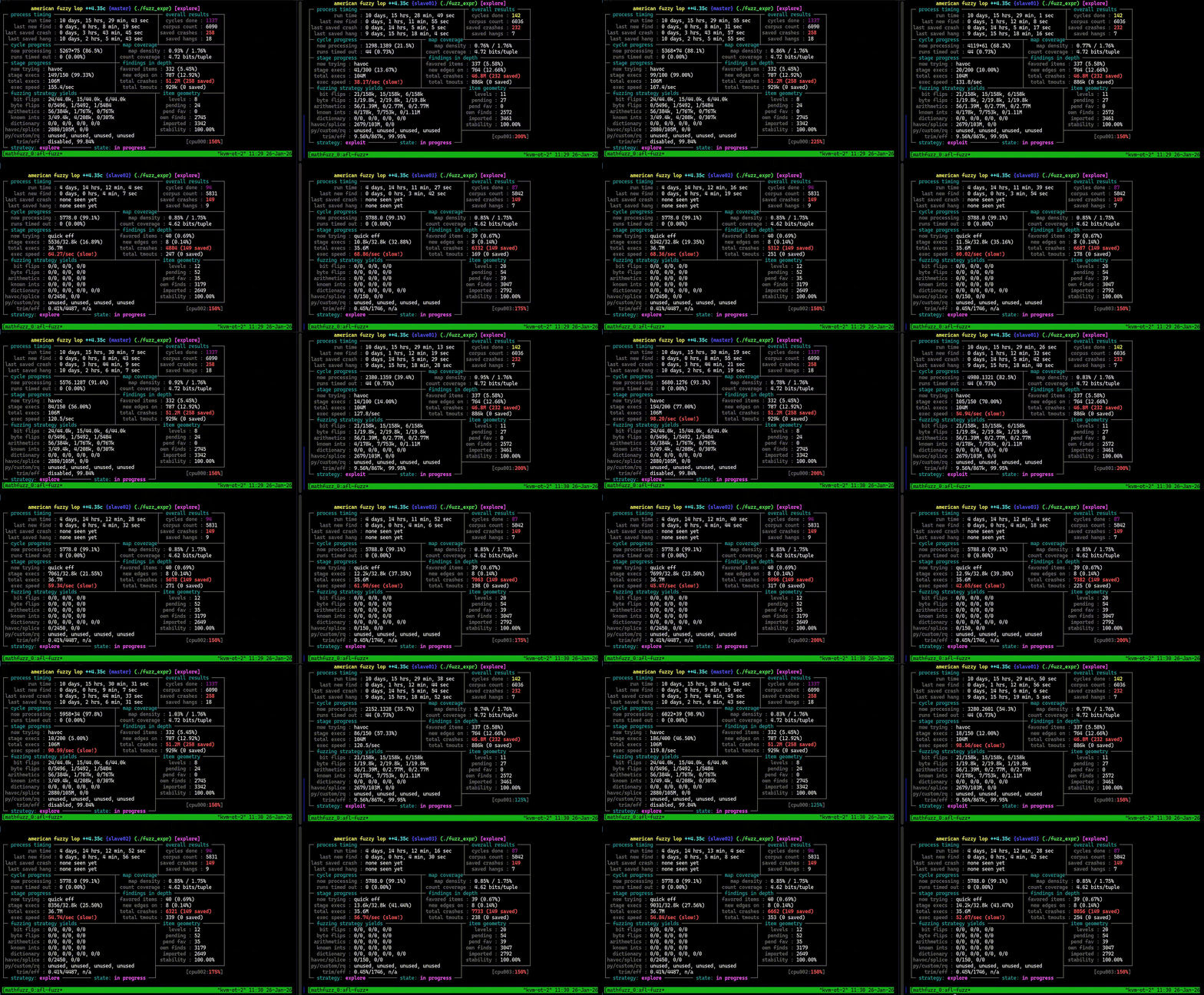
At this stage of the research, we had a fuzzing setup, that was utilizing 100% of our CPU. Thus we left it for some time, for it to start finding crashes.
Stage 2: Vulnerability
2.1 Discovered Crashes
At this point, we had left the fuzzer running for a few days, and the fuzzer had been finding crashes during this time. At this point of our research, we began digging deeper into the crashes themselves, trying to find what inputs caused them.
Output fuzzing results:
cd /srv/Fuzzing/targets/MathParser.org-mXparser
afl-whatsup findings
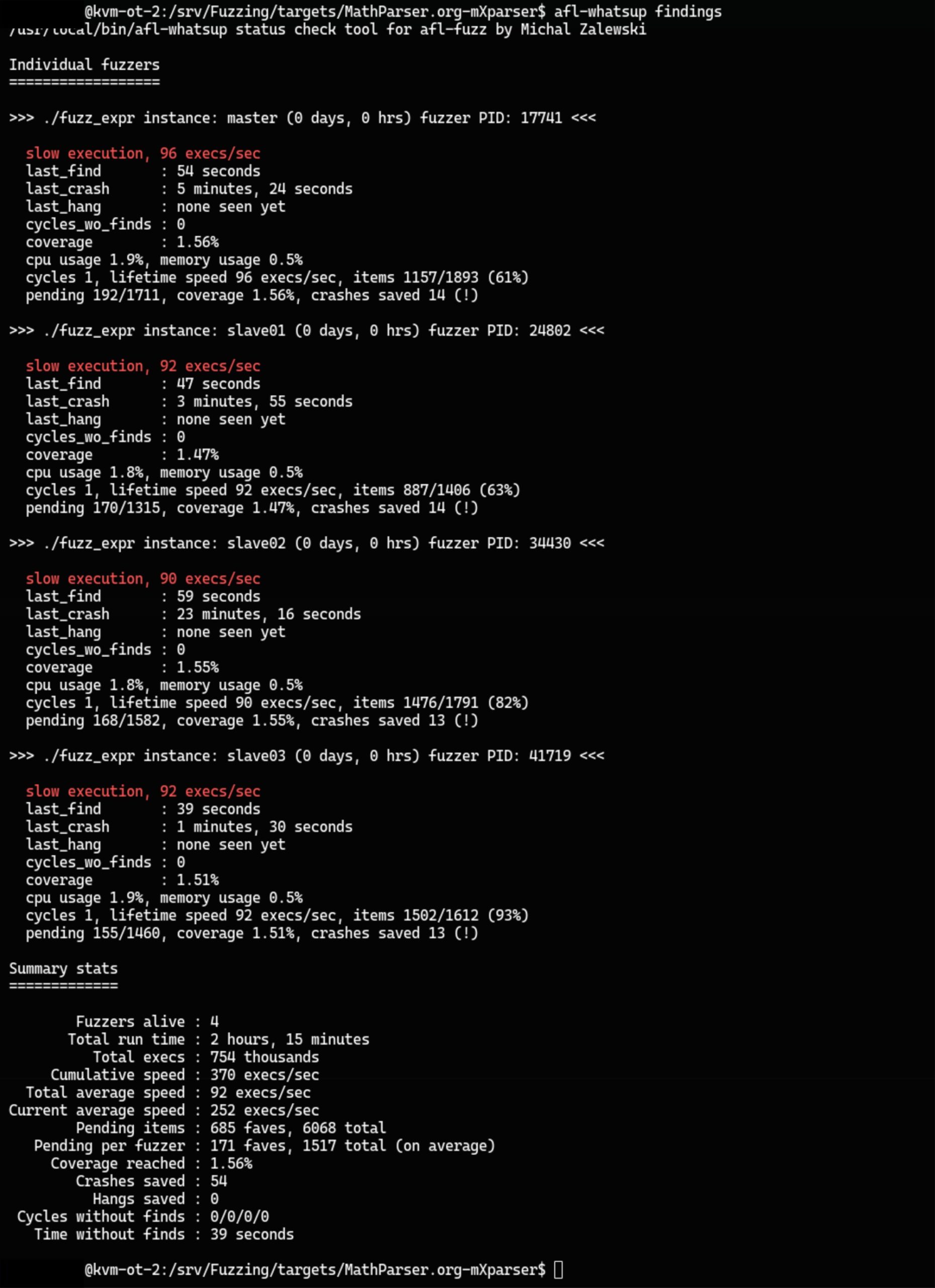
Looking deeper into some of these crashes, we noticed a pattern: the input had been causing recursive loops, which made the program run out of memory and crash. This was likely caused by the program not correctly checking for recursion.
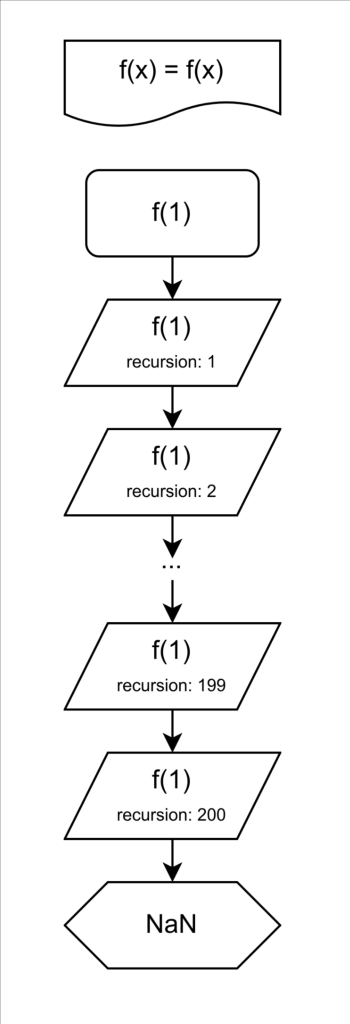
2.2 Understanding the Error
Usually, the library does keeps track of recursion, and it should return NaN when it reaches max recursion. In theory, this should prevent infinite recursion. This is visually showcased below.
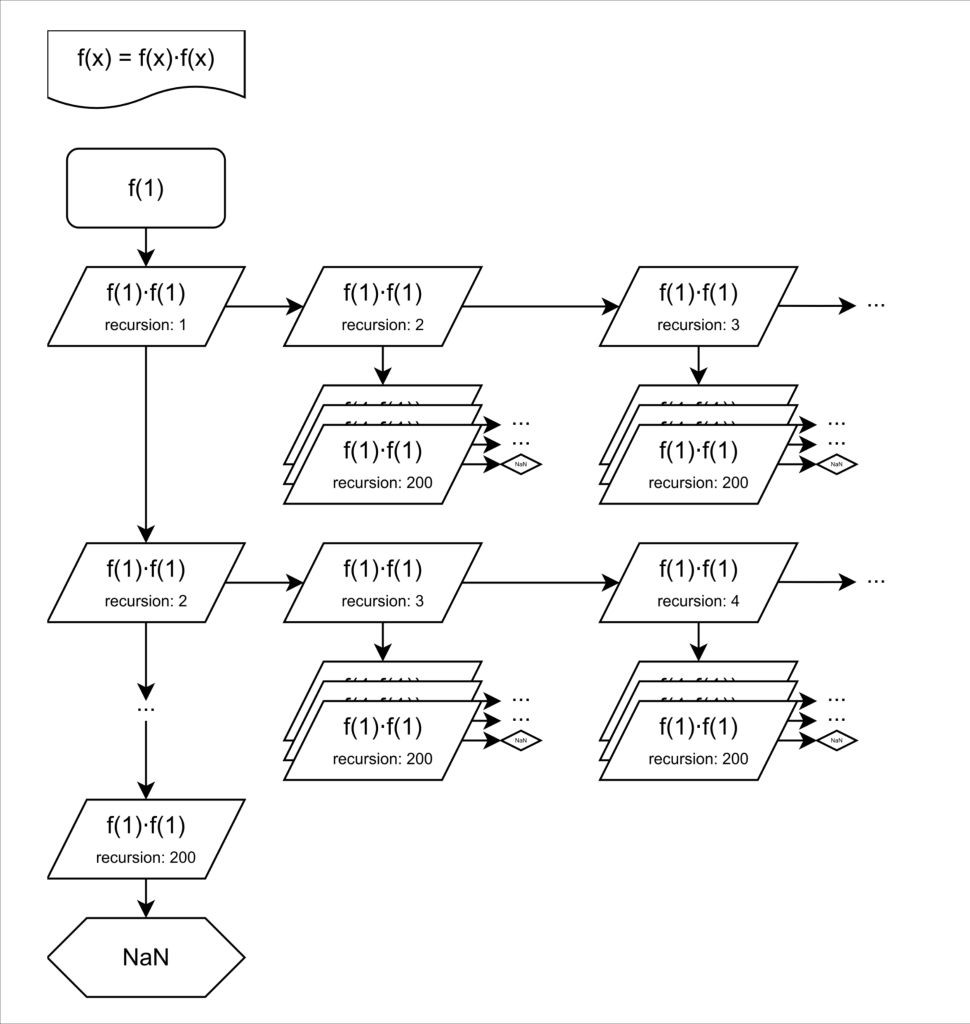
However, in this function, every new function call the state gets cloned. This includes the recursion counter. When one branch returns NaN, it continues to calculate all the other branches. Ultimately, this causes excessive memory usage, leading to the program crashing.
2.3 Affected Software Search
Thus, knowing that mXparser was vulnerable to such an error, we began looking for programs that might implement this as a library, where they would also be affected by this vulnerability. This was done by looking for the vulnerable function name within GitHub, to track down related projects.
One of the ones that stood out was a Minecraft plugin, called calcmod. What followed was setting up a server, and attempting to recreate the same crash. This plugin allows a unprivileged player to execute a command within in-game chat, in order to interact with the plugin. When crafted to include nested recursion, it causes the server to crash. This vulnerability effectively allowed any player to crash any server, which had this plugin installed. Being the case that this plugin had over 2+ million downloads, this had some significance, as individuals with malicious intent could cause denial of service to these servers.
Stage 3: Disclosure
What followed next, was contacting the library maintainer, as well as the plugin developer. We notified both them, and made them aware of the issue, as well as the specific function that causes the vulnerability. Both the library maintainer and plugin developer have confirmed patches.
MITRE CVE Submission
Our next step was making a CVE submission. Since neither of us had experience reporting CVEs, this was quite a confusing step for us. We found this blog post had useful information on the steps involved. Two main forms within MITRE that needed to be filled out were “Request CVE ID”, and “Notify CVE about a publication” after all parties confirmed patches.
It took quite a while to get a response from MITRE, but they confirmed to use CVE-2026-30451.
Conclusion
Ultimately, this research allowed us to discover CVE-2026-30451. We learned a great deal about program fuzzing, and how it can be used to discover new vulnerabilities. Even though something seems difficult, it might not always be the case.
CVE Details
Number of vulnerabilities reported or IDs requested (1-10): 1
Vulnerability type: Other or Unknown
Other vulnerability type: Algorithmic complexity vulnerability
Vendor of the product(s): Mariusz Gromada
Affected product(s)/code base:
mXparser library, versions 1.0 – 6.1 (Updated binary underway), issue fixed
CalcMod plugin, versions 1.1.0 – 1.4.3